Hello,
I've been using TexGen for the past couple of weeks to generate fabric weaves that I then intend to impact test using ABAQUS. I am relatively inexperienced with programming and scripting, so I ask for your patience.
I've had some trouble recently creating a 'non-crimp fabric;' TexGen does not accept the Python script I've written for it, citing an 'Invalid Syntax' when 'for Yarn in Yarns' is used.
The curious thing is that the same instruction was used in creation of a tri-axial braid fabric which was accepted, albeit a bit messily.
Can anyone suggest a solution to my problem? The scripts I've written for both the non-crimp fabric and the tri-axial braid are available on request. I'd really appreciate any help anyone can give me.
Cheers,
Adam
Non Crimp Fabric
Moderators: Martin, Developers
This is the script I've been using;
Textile = CTextile()
Yarns = [CYarn(), CYarn()]
w = 0.95
s = 1
h = 0.2
Yarns[0].AddNode(CNode(XYZ(0, 0, 0)))
Yarns[0].AddNode(CNode(XYZ(0, s, 0)))
Yarns[1].AddNode(CNode(XYZ(0, 0, h)))
Yarns[1].AddNode(CNode(XYZ(s, 0, h)))
for Yarn in Yarns
InlaySection = CSectionPowerEllipse(w, h, 0.5)
Yarn.AssignSection(CYarnSEctionConstant(InlaySection))
Yarn.AddRepeat(XYZ(s, 0, 0))
Yarn.AddRepeat(XYZ(0, s, 0))
Yarn.AssignInterpolation(CInterpolationCubic())
Yarn.SetResolution(40)
Textile.AddYarn(Yarn)
a = 0.05
r = 0.025
u = 1.5*h+r
d = -0.5*h-r
StitchYarn = CYarn()
StitchYarn.AddNode(CNode(XYZ(2*a, a, u), XYZ(1, 1, 0)))
StitchYarn.AddNode(CNode(XYZ(s+a, s-a, u), XYZ(1, 1, 0)))
StitchYarn.AddNode(CNode(XYZ(s+a, s, d), XYZ(0, 1, 0)))
StitchYarn.AddNode(CNode(XYZ(s+2*a, 2*s-a, d), XYZ(0, 1, 0)))
StitchYarn.AddNode(CNode(XYZ(s+a, 2*s, d+a), XYZ(-1, 0, 0)))
StitchYarn.AddNode(CNode(XYZ(s-a, 2*s, d+a), XYZ(-1, 0, 0)))
StitchYarn.AddNode(CNode(XYZ(s-2*a, 2*s-a, d), XYZ(0, -1, 0)))
StitchYarn.AddNode(CNode(XYZ(s-a, s, d), XYZ(0, -1, 0)))
StitchYarn.AddNode(CNode(XYZ(s-2*a, s+a, u), XYZ(-1, 1, 0)))
StitchYarn.AddNode(CNode(XYZ(-a, 2*s-a, u), XYZ(-1, 1, 0)))
StitchYarn.AddNode(CNode(XYZ(-a, 2*s, d), XYZ(0, 1, 0)))
StitchYarn.AddNode(CNode(XYZ(-2*a, 3*s-a, d), XYZ(0, 1, 0)))
StitchYarn.AddNode(CNode(XYZ(-a, 3*s, d+a), XYZ(1, 0, 0)))
StitchYarn.AddNode(CNode(XYZ(a, 3*s, d+a), XYZ(1, 0, 0)))
StitchYarn.AddNode(CNode(XYZ(2*a, 3*s-a, d), XYZ(0, -1, 0)))
StitchYarn.AddNode(CNode(XYZ(a, 2*s+a, d), XYZ(0, -1, 0)))
StitchYarn.AddNode(CNode(XYZ(2*a, 2*s+a, u), XYZ(1, 1, 0)))
StitchYarn.AddRepeat(XYZ(1, 0, 0))
StitchYarn.AddRepeat(XYZ(0, 2, 0))
StitchSection = CSectionEllipse(2*r, 2*r)
StitchYarn.AssignSection(CYarnSectionConstant(StitchSection))
StitchYarn.AssignInterpolation(CInterpolationBezier())
StitchYarn.SetResolution( 8 )
StitchYarn.Translate(XYZ(0.5*s, 0.5*s+r, 0))
Textile.AddYarn(StitchYarn)
Textile.AssignDomain(CDomainPlanes(XYZ(0, 0, -1), XYZ(4*s, 4*s, 1)))
AddTextile("noncrimpfabric", Textile)
Textile = CTextile()
Yarns = [CYarn(), CYarn()]
w = 0.95
s = 1
h = 0.2
Yarns[0].AddNode(CNode(XYZ(0, 0, 0)))
Yarns[0].AddNode(CNode(XYZ(0, s, 0)))
Yarns[1].AddNode(CNode(XYZ(0, 0, h)))
Yarns[1].AddNode(CNode(XYZ(s, 0, h)))
for Yarn in Yarns
InlaySection = CSectionPowerEllipse(w, h, 0.5)
Yarn.AssignSection(CYarnSEctionConstant(InlaySection))
Yarn.AddRepeat(XYZ(s, 0, 0))
Yarn.AddRepeat(XYZ(0, s, 0))
Yarn.AssignInterpolation(CInterpolationCubic())
Yarn.SetResolution(40)
Textile.AddYarn(Yarn)
a = 0.05
r = 0.025
u = 1.5*h+r
d = -0.5*h-r
StitchYarn = CYarn()
StitchYarn.AddNode(CNode(XYZ(2*a, a, u), XYZ(1, 1, 0)))
StitchYarn.AddNode(CNode(XYZ(s+a, s-a, u), XYZ(1, 1, 0)))
StitchYarn.AddNode(CNode(XYZ(s+a, s, d), XYZ(0, 1, 0)))
StitchYarn.AddNode(CNode(XYZ(s+2*a, 2*s-a, d), XYZ(0, 1, 0)))
StitchYarn.AddNode(CNode(XYZ(s+a, 2*s, d+a), XYZ(-1, 0, 0)))
StitchYarn.AddNode(CNode(XYZ(s-a, 2*s, d+a), XYZ(-1, 0, 0)))
StitchYarn.AddNode(CNode(XYZ(s-2*a, 2*s-a, d), XYZ(0, -1, 0)))
StitchYarn.AddNode(CNode(XYZ(s-a, s, d), XYZ(0, -1, 0)))
StitchYarn.AddNode(CNode(XYZ(s-2*a, s+a, u), XYZ(-1, 1, 0)))
StitchYarn.AddNode(CNode(XYZ(-a, 2*s-a, u), XYZ(-1, 1, 0)))
StitchYarn.AddNode(CNode(XYZ(-a, 2*s, d), XYZ(0, 1, 0)))
StitchYarn.AddNode(CNode(XYZ(-2*a, 3*s-a, d), XYZ(0, 1, 0)))
StitchYarn.AddNode(CNode(XYZ(-a, 3*s, d+a), XYZ(1, 0, 0)))
StitchYarn.AddNode(CNode(XYZ(a, 3*s, d+a), XYZ(1, 0, 0)))
StitchYarn.AddNode(CNode(XYZ(2*a, 3*s-a, d), XYZ(0, -1, 0)))
StitchYarn.AddNode(CNode(XYZ(a, 2*s+a, d), XYZ(0, -1, 0)))
StitchYarn.AddNode(CNode(XYZ(2*a, 2*s+a, u), XYZ(1, 1, 0)))
StitchYarn.AddRepeat(XYZ(1, 0, 0))
StitchYarn.AddRepeat(XYZ(0, 2, 0))
StitchSection = CSectionEllipse(2*r, 2*r)
StitchYarn.AssignSection(CYarnSectionConstant(StitchSection))
StitchYarn.AssignInterpolation(CInterpolationBezier())
StitchYarn.SetResolution( 8 )
StitchYarn.Translate(XYZ(0.5*s, 0.5*s+r, 0))
Textile.AddYarn(StitchYarn)
Textile.AssignDomain(CDomainPlanes(XYZ(0, 0, -1), XYZ(4*s, 4*s, 1)))
AddTextile("noncrimpfabric", Textile)
Re: Non Crimp Fabric
That's great, thanks - the fabric works fine in TexGen now.
I'm having some trouble transferring it to ABAQUS, however.
I've exported the fabric as an ABAQUS Voxel File, where the element orientations data was saved as noncrimpfabric.ori and the additional element data as noncrimpfabric.eld.
I then attempted to import it on ABAQUS 6.6-3 by going File > Import > Model and found a file in the same location I saved the Python scripts as noncrimpfabric.inp.
I tried running it, but was met with the following error message;
Thanks again for your help,
Adam
I'm having some trouble transferring it to ABAQUS, however.
I've exported the fabric as an ABAQUS Voxel File, where the element orientations data was saved as noncrimpfabric.ori and the additional element data as noncrimpfabric.eld.
I then attempted to import it on ABAQUS 6.6-3 by going File > Import > Model and found a file in the same location I saved the Python scripts as noncrimpfabric.inp.
I tried running it, but was met with the following error message;
Have you encountered similar problems? Or what am I doing wrong?AbaqusException: Unknown keyword "distributiontable". The keyword may be misspelled, obsolete, or invalid.
This occurred while while parsing the input file. Run the input file through the batch pre-processor to check for syntax errors.
Thanks again for your help,
Adam
Re: Non Crimp Fabric
I've tried exporting the NCF to ABAQUS 6.9-3. It successfully created a model, but it doesn't look anything like what came up on TexGen...
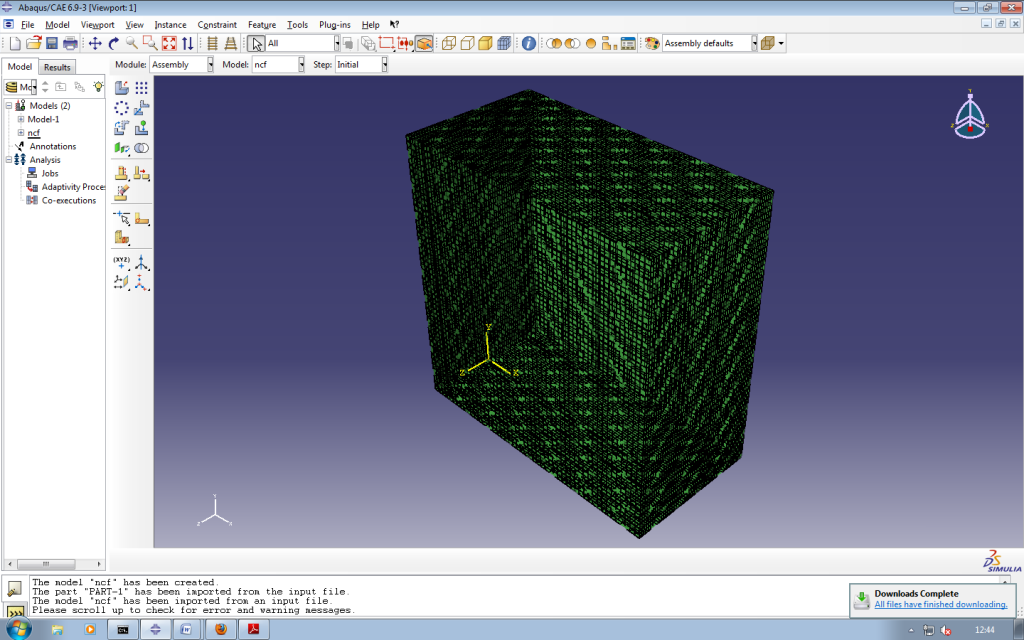
I tried the same thing with a 3D weave and a triaxial braid fabric and came up with the following error messages;
Thanks,
Adam
I tried the same thing with a 3D weave and a triaxial braid fabric and came up with the following error messages;
The model "3dweave" has been created.
WARNING: Empty part PART-1. This occurred while reading keyword options within part definition.
WARNING: Part instance PART-1-1 references an empty part. A new part named PART-1-1 will be created from the mesh data in part instance PART-1-1.
WARNING: Empty part instance PART-1-1. This occurred while processing part PART-1. Neither the original part nor the part instance PART-1-1 contain mesh data.
The model "3dweave" has been imported from an input file.
Please scroll up to check for error and warning messages.
Any ideas on how to circumvent these problems?The model "triaxialbraid" has been created.
AbaqusException: in keyword *NODE, file "triaxialbraid.inp", line 6: Invalid nodal coordinate values were specified for the following nodes: 1 2 3 4 5 6 7 8 9 10 11 12 13 14 15 16 17 18 19 20 21 22 23 24 25 26 27 28 29 144 145 146 147 148 149 150 151 152 153 154 155 156 157 158 159 160 161 162 163 164 165 166 167 168 169 170 171 172 287 288 289 290 291 292 293 294 295 296 297 298 299 300 301 302 303 304 305 306 307 308 309 310 311 312 313 314 315 345 346 347 348 349 350 351 352 353 354 355 356 357 358 359
This occurred while parsing the input file. Run the input file through the batch pre-processor to check for syntax errors.
The model "triaxialbraid" has been imported from an input file.
Thanks,
Adam
Re: Non Crimp Fabric
Hi Adam,
The model is showing all the voxels, both matrix and yarn which is why it looks like a solid block. If you select the Create Display Group option you will then be able to highlight and view the individual yarns as shown below.
I think that your error messages are because the equations generated by texgen contain multiple node sets. This is not allowed in Abaqus CAE so these files need to be run from the command line.
Hope that helps,
Louise
The model is showing all the voxels, both matrix and yarn which is why it looks like a solid block. If you select the Create Display Group option you will then be able to highlight and view the individual yarns as shown below.
- AbaqusScreen.png (169.97 KiB) Viewed 24964 times
Hope that helps,
Louise
Re: Non Crimp Fabric
Hello,
Can you please send to me a noncrimpfabric file?
I would appreciate. Thank you.
cem
Can you please send to me a noncrimpfabric file?
I would appreciate. Thank you.
cem
Re: Non Crimp Fabric
Hi,
Welcom to the forum.
I have sent a tg3 file for a non crimp fabric by email.
Louise
Welcom to the forum.
I have sent a tg3 file for a non crimp fabric by email.
Louise
Re: Non Crimp Fabric
Hi,
You have prepared an excellent model. Thanks a lot for your e-mail.
I wish you success with your studies.
cem
You have prepared an excellent model. Thanks a lot for your e-mail.
I wish you success with your studies.
cem
Re: Non Crimp Fabric
Hi,
Like Samnite/Adam I am trying to do impact testing on fabrics. I wish to create a small section of fabric with TexGen, then penetrate the fabric with various shapes. Hence I'm posting here rather than in my previous thread.
When you say "these files need to be run from the command line", does that mean we cannot do any additions to the modelling in Abaqus CAE,
OR
is it just a failing of the "Import" setting in Abaqus CAE, and by using the command line to open it we can manipulate it in CAE?
If my TegGen (exported as ABAQUS Dry Fibre File) file is called "PlainWeave1.inp", and has orientation files "PlainWeave1.ori" and "PlainWeave1.ori" - what do I write in the ABAQUS command line to correctly open this model for editing? I've been trying some different things in the command line but none have worked.
Thanks,
David
p.s. I'm using ABAQUS 6.10-1, in case that matters.
Like Samnite/Adam I am trying to do impact testing on fabrics. I wish to create a small section of fabric with TexGen, then penetrate the fabric with various shapes. Hence I'm posting here rather than in my previous thread.
When you say "these files need to be run from the command line", does that mean we cannot do any additions to the modelling in Abaqus CAE,
OR
is it just a failing of the "Import" setting in Abaqus CAE, and by using the command line to open it we can manipulate it in CAE?
If my TegGen (exported as ABAQUS Dry Fibre File) file is called "PlainWeave1.inp", and has orientation files "PlainWeave1.ori" and "PlainWeave1.ori" - what do I write in the ABAQUS command line to correctly open this model for editing? I've been trying some different things in the command line but none have worked.
Thanks,
David
p.s. I'm using ABAQUS 6.10-1, in case that matters.
Re: Non Crimp Fabric
Hi David,
The problem with importing the model into CAE lies with the boundary conditions as specified by TexGen. The equations link multiple nodes together which is not permissible in CAE. If you import the model straight into CAE then the boundary conditions will be lost. The way forward would probably be to backup your .inp file as provided by TexGen, open the model in CAE, make your additions as required, save the model and then copy and paste the boundary conditions from the backup into your new .inp file.
The simulation can then be run from the command line, thus using the correct boundary conditions and also loading the .ori and .eld files.
Hope that helps,
Louise
The problem with importing the model into CAE lies with the boundary conditions as specified by TexGen. The equations link multiple nodes together which is not permissible in CAE. If you import the model straight into CAE then the boundary conditions will be lost. The way forward would probably be to backup your .inp file as provided by TexGen, open the model in CAE, make your additions as required, save the model and then copy and paste the boundary conditions from the backup into your new .inp file.
The simulation can then be run from the command line, thus using the correct boundary conditions and also loading the .ori and .eld files.
Hope that helps,
Louise
Re: Non Crimp Fabric
Thanks for the quick reply, I'll try that this weekend.
The BCs are something I'd like to define myself, but I think I can figure that out on my own. For me the fibre-orientation (.ori) file is the most important part. I'm happy to use the method you describe, but if there is a way to correctly import the orientation file to CAE that would be useful.
Thanks again,
David
The BCs are something I'd like to define myself, but I think I can figure that out on my own. For me the fibre-orientation (.ori) file is the most important part. I'm happy to use the method you describe, but if there is a way to correctly import the orientation file to CAE that would be useful.
Thanks again,
David
Re: Non Crimp Fabric
Hello again,
Once I have edited my file in ABAQUS CAE, I need to get the new inp file to follow the steps you mentioned above (copy/paste the BCs and orientations).
To my knowledge, if I edit it in CAE then "Submit" the job, this would create the new inp file that I could then edit. Instead, when I submit it I get the error that "The following material orientations reference an assembly-level discreet field. > Orientation 1 in "PART-1" > The input file was not generated ... ". Thus I get no new .inp file to edit and submit manually.
I realise this more of an ABAQUS problem, than TexGen, but other users on this thread seem to have had success with using ABAQUS and TexGen together, so I thought I'd see if anyone had solved this problem. It may well be there's another way to get the new inp file from CAE without submitting a job, but I have not found it (I have looked mostly under File>Export... and File>Save As...")
Thanks,
David
EDIT: I have also tried "Write Input". Same problem as "Submit Job", mentioned above.
Once I have edited my file in ABAQUS CAE, I need to get the new inp file to follow the steps you mentioned above (copy/paste the BCs and orientations).
To my knowledge, if I edit it in CAE then "Submit" the job, this would create the new inp file that I could then edit. Instead, when I submit it I get the error that "The following material orientations reference an assembly-level discreet field. > Orientation 1 in "PART-1" > The input file was not generated ... ". Thus I get no new .inp file to edit and submit manually.
I realise this more of an ABAQUS problem, than TexGen, but other users on this thread seem to have had success with using ABAQUS and TexGen together, so I thought I'd see if anyone had solved this problem. It may well be there's another way to get the new inp file from CAE without submitting a job, but I have not found it (I have looked mostly under File>Export... and File>Save As...")
Thanks,
David
EDIT: I have also tried "Write Input". Same problem as "Submit Job", mentioned above.
Re: Non Crimp Fabric
Hi David,
I'm not an ABAQUS expert but have consulted a colleague on this one! You could try loading your model into CAE, making your changes and then use the "Write Input" option in the Job Manager to generate a new .inp file. The easiest thing would then be to cut and paste any changes you have made from your new .inp file into your original one. This way you will preserve your reference to the orientation file in the original copy.
I hope that helps,
Louise
I'm not an ABAQUS expert but have consulted a colleague on this one! You could try loading your model into CAE, making your changes and then use the "Write Input" option in the Job Manager to generate a new .inp file. The easiest thing would then be to cut and paste any changes you have made from your new .inp file into your original one. This way you will preserve your reference to the orientation file in the original copy.
I hope that helps,
Louise
Re: Non Crimp Fabric
Hello,
I have the same problem as David has. I created an assembly in Abaqus CAE. I copied all the new fragments of my new .inp file to the original one. When I do run this file in abaqus command, it aborts due to the following error
PROCESSING PART, INSTANCE, AND ASSEMBLY INFORMATION
*******************************************************
***ERROR: in keyword *DISTRIBUTIONTABLE, file "Multirapier30341207.inp", line
250709: The keyword is misplaced. It can be suboption for the
following keyword(s)/level(s): model
The keyword is in the orientation passage:
********************
*** ORIENTATIONS ***
********************
** Orientation vectors
** 1st vector represents the fibre direction
** 2nd vector is an arbitrary vector perpendicular to the first
*Distribution Table, Name=TexGenOrientationVectors
COORD3D,COORD3D
*Distribution, Location=Element, Table=TexGenOrientationVectors, Name=TexGenOrientationVectors, Input=Multirapier30341207.ori
*Orientation, Name=TexGenOrientations, Definition=coordinates
TexGenOrientationVectors
1, 0
I don't know how to solve this problem. Is there an error with model/assembly/part definition? Copying the "Orientations-Input" in my new Inputfile provoques the same error.
Did you make any achievments on the problem with the orientations David ? Or do you have an idea Louise?
I hope you can help me
Thanks
Jost
I have the same problem as David has. I created an assembly in Abaqus CAE. I copied all the new fragments of my new .inp file to the original one. When I do run this file in abaqus command, it aborts due to the following error
PROCESSING PART, INSTANCE, AND ASSEMBLY INFORMATION
*******************************************************
***ERROR: in keyword *DISTRIBUTIONTABLE, file "Multirapier30341207.inp", line
250709: The keyword is misplaced. It can be suboption for the
following keyword(s)/level(s): model
The keyword is in the orientation passage:
********************
*** ORIENTATIONS ***
********************
** Orientation vectors
** 1st vector represents the fibre direction
** 2nd vector is an arbitrary vector perpendicular to the first
*Distribution Table, Name=TexGenOrientationVectors
COORD3D,COORD3D
*Distribution, Location=Element, Table=TexGenOrientationVectors, Name=TexGenOrientationVectors, Input=Multirapier30341207.ori
*Orientation, Name=TexGenOrientations, Definition=coordinates
TexGenOrientationVectors
1, 0
I don't know how to solve this problem. Is there an error with model/assembly/part definition? Copying the "Orientations-Input" in my new Inputfile provoques the same error.
Did you make any achievments on the problem with the orientations David ? Or do you have an idea Louise?
I hope you can help me
Thanks
Jost